Linqa
➜ Breaking language barriers
Linqa is a multilingual whiteboard for supporting international collaboration. Users place content items (notes, text blocks, PDF, images, audio, video, documents) on a shared whiteboard and discuss them in a chat-like manner. All content and discussion is translated automatically. Translations can be revised manually.
A particular Linqa installation uses 2 languages out of a set of 9: German 🇩🇪, English 🇬🇧, Spanish 🇪🇸, Finnish 🇫🇮, French 🇫🇷, Polish 🇵🇱, Portuguese (Brazilian) 🇧🇷, Swedish 🇸🇪, and Ukrainian 🇺🇦.
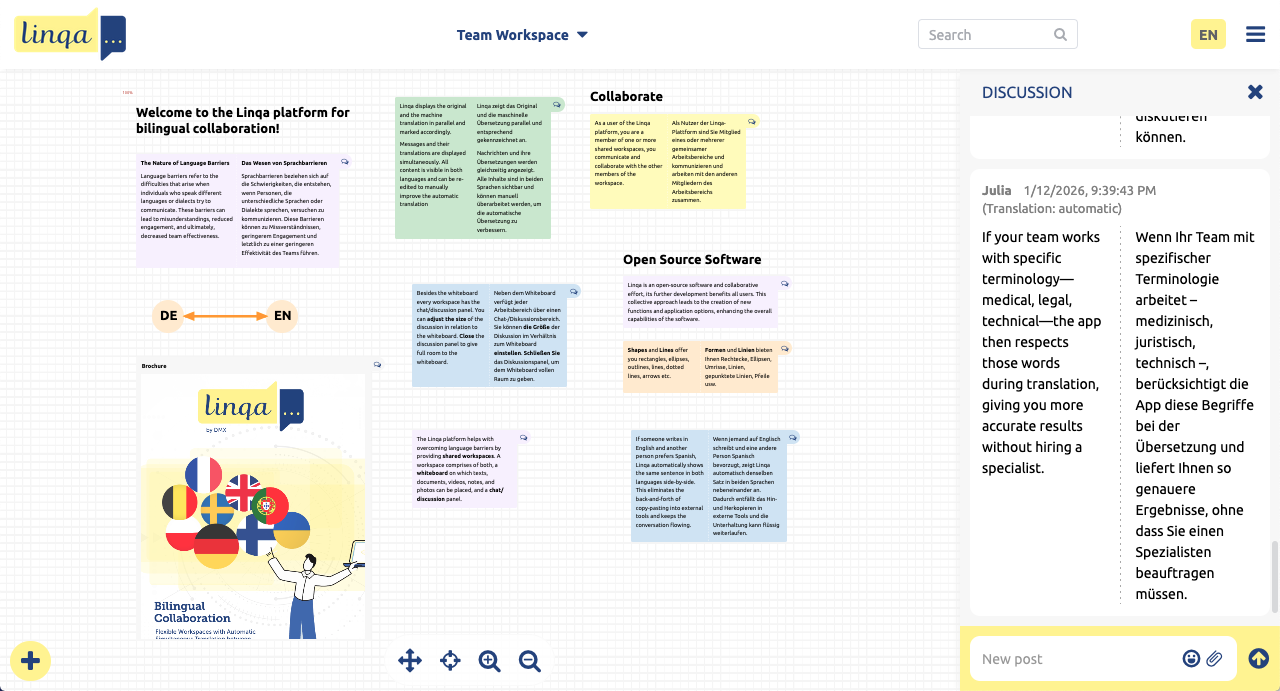
Linqa has 3 access levels: Administrators create whiteboards and assign users, Editors create content and arrange the whiteboard, and normal Users browse content and discuss.
Linqa is a web application for the DMX platform, developed originally for DMX Systems UG. Like the DMX platform Linqa is Open Source software under the GNU AGPL license.
Find more detailed information in the Linqa README.
Promotional content
Visit the Linqa website and blog.
View the Linqa brochure (PDF) (opens in a separate window).
Try out
Go to the Linqa website and request access to the Linqa demo installation. You'll receive login information by email then. Once logged in use the top/right menu for help.
The demo user account is a full Linqa administrator account. So you can create user accounts to test Linqa's collaboration features as well. Note that account creation is based on real email addresses. For a description of the administrative features please see Create users and workspaces in the Linqa README.
Self-hosting
You can self-host Linqa on your own server. Linqa requires Java 8 to be installed on the server. For the account/password related workflows Linqa relies on an infrastructure for sending email. For a complete Linqa installation guide see the Linqa README.
Support
For discussing Linqa and for getting support please use the DMX Forum.
For specific bug reports or feature requests please create an issue:
https://github.com/dmx-systems/dmx-linqa/issues