DM6 Elm
DM6 Elm is a cognitive work environment, built to support focus. Beneficial for all kinds of knowledge workers, in particular for ADHD people.
DM6 Elm is the 6th version of the 25+ years running Open Source project "DeepaMehta", rewritten in Elm (see also the DMX Platform project). Learn more about its history on the About page.
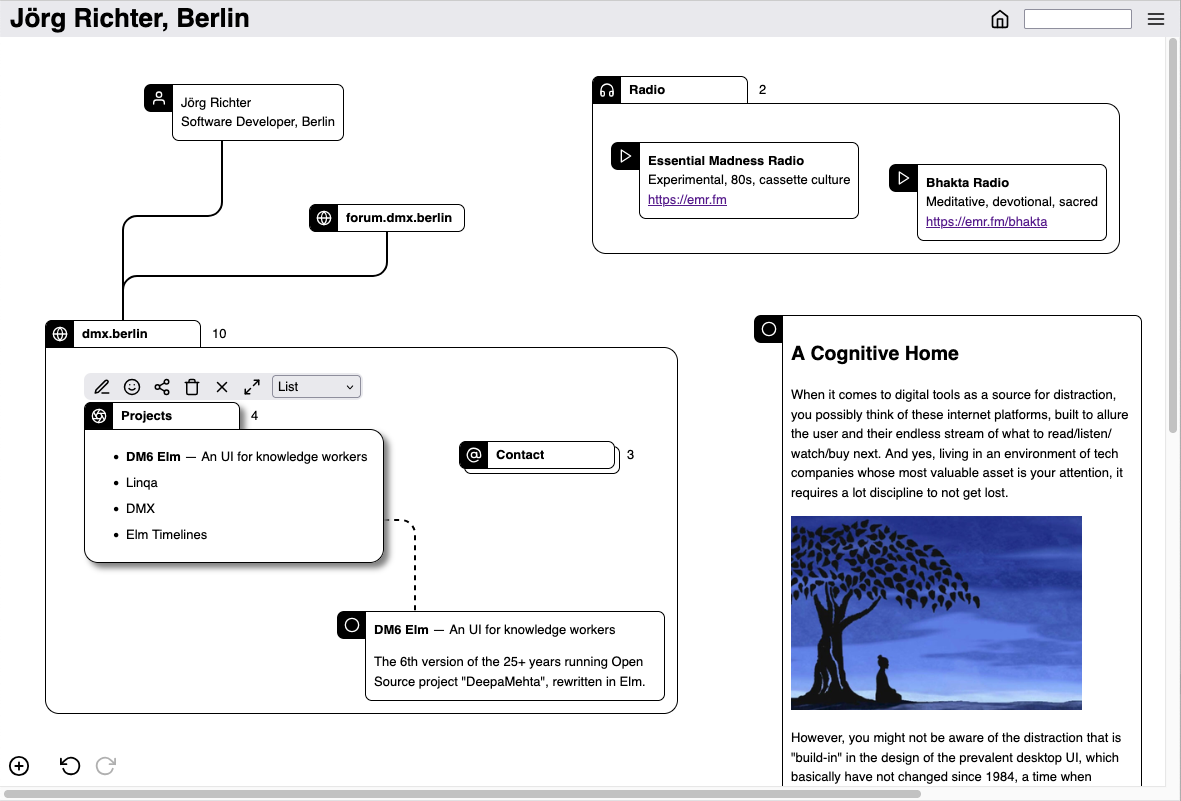
Overview
A DM6 Elm screen consists of topics and associations. Topics are content holders (text, images, ...). Associations are relationships between 2 topics that facilitates both, a rich information display, and associative browsing. Topics and associations can be nested in other topics (called boxes then).
Topic content is stored and edited as Markdown (like e.g. in Obsidian or GitHub). So you have headings, paragraphs, bold, italic, links, lists, ... and you can insert images. Have a look to the Markdown Guide.
Try out
No installation required, no account required. To use DM6 Elm visit this link:
https://dmx-systems.github.io/dm6-elm-demo/
You'll see a mostly empty page. Start creating topics by the plus-button in the bottom/left corner. Nest topics by dropping them on each other. Create associations by click-and-hold a topic, wait a short moment, then drag.
DM6 Elm is a local-first application. Content you create is stored locally in your browser. When you close the browser window and revisit the above link later on, your content will show up again. To transfer content to another browser, use the import/export feature (see DM6 Elm's top/right menu).
Support
For getting support and for general discussion please use the DMX Forum.
For specific bug reports or feature requests please create an issue:
https://github.com/dmx-systems/dm6-elm/issues